
AWS CloudFormation - Parser Full Documentation
The parser for CloudFormation translates the docker-compose.yml file into CloudFormation. The parser logic can be found in GitHub inside docker-to-iac repo.
Parser language abbreviation for API
languageAbbreviation:CFN.
Prerequisite to deploy CloudFormation Template
To deploy the CloudFormation template in your AWS account, you need a VPC with internet access. It should also be possible to create ENI (AWS Elastic Network Interface) with public IP. The template uses AWS Fargate without an Application Load Balancer to save costs.
If you have the default VPC in your AWS account that should be sufficient.
Architecture
The architecture deploys an ECS service into a serverless AWS Fargate cluster. An ECS service = service from docker-compose.yml. This means if you have two services in your docker-compose file, you will end up deploying two ECS services into your Fargate cluster.
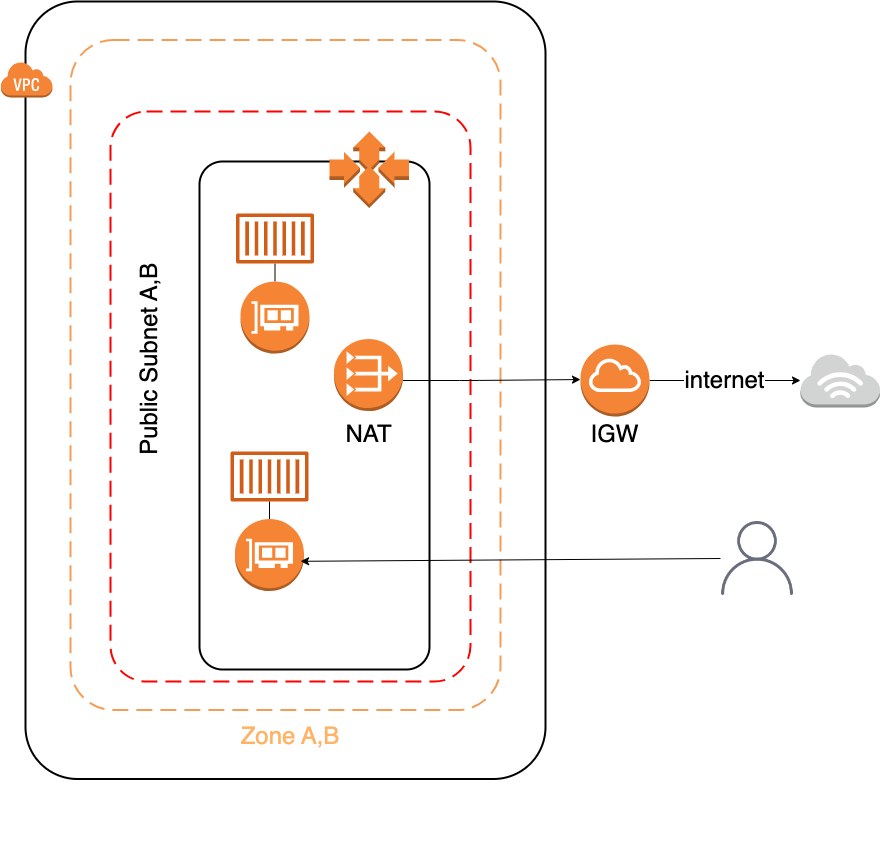
The tasks within ECS services create an ENI that has a public IP address. Since we do not use an ALB (Application Load Balancer), you can only access the tasks via the port and the public IP address.
When creating CloudFormation template, we decided not to use ALB to save costs. You can of course modify the CloudFormation template and add your ALB if needed.
There is also a Container Security Group linked to ECS Service, only the ports required for TCP/IP communication are open.
Default output format
- The default output format for this parser:
YAML.
Supported Docker Compose Variables
The current version supports the following Docker Compose variables:
For services:
- image
- environment
- ports
- command
NOTE
The supported variables that are not on this list are ignored. This means that they are not translated by the parser in Infrastructure as Code from docker-compose.yml.
Multi Services Support
Multi services support for CloudFormation: yes
Please read more about multi service support here.